If you have a WordPress website and happen to be in the eCommerce space, the chances are you’re using WooCommerce, which is the backbone behind nearly 170,000 eCommerce sites in the UK. Recently WooCommerce store owners started seeing a lot of failed orders appearing overnight. Some noted hundreds every day.
Upon investigation, the failed orders were not genuine, but allappeared to be generated by bots (malicious programs designed to create orders). Hundreds of generic name combinations living at fake addresses were used. This has proven to be a headache for store owners from a logistical point of view, but more worrying is the reason why it happened. That reason is called card testing fraud.

What is card testing fraud?
Put simply, when fraudsters obtain card information they want to find out if they can use it to steal your money. To do so they use card testing attacks on vulnerable eCommerce websites. Fraudsters generate thousands of orders for small amounts of money to test the waters. Most of the orders fail, but some do succeed giving the fraudsters the green light to go ahead and steal vast amounts of cash from whomever owns the card. They can test thousands of cards this way but only need a few to succeed to make it worth their while.
This is bad for store owners, not least because of the reputational damage, but also because of the potential charges or fees they may face and the strain on server resources at peak times affecting performance. There may also be legal ramifications if the card testing fraud is not dealt with quickly.
What can you do if your site is targeted?
1. Install updates when they become available
It is imperative that you keep your WordPress site up to date. That’s basic advice for any WordPress website, but it is critical if you are running an eCommerce site that holds customer and financial information. Plugins pose a risk by offering access if they go out of date. Once a vulnerability has been discovered and a patch has been released, it is in your best interests to install it as soon as possible to protect yourself, your site and your customers.
2. Protect your WordPress website with a security plugin
Install a security plugin on your site such as Wordfence or Sucuri. These will periodically scan your site and report any vulnerabilities they find. They also include built in firewall protection, allowing you to block IP addresses from known sources associated with illegal activity, and prevent brute force attacks designed to gain administrator access to your site.
3. Research the issue to find the cause
If you have done all the above and you are still experiencing issues, then do some research. It’s highly likely other site owners are experiencing the same issue as you and may have already found a resolution. If not, then at least you may be pointed in the right direction to finding the cause and notifying the relevant parties.
What caused the recent issue for WooCommerce stores?
In the case of the recent issues that WooCommerce store owners have been seeing, the culprit was the PayPal Payments extension. At the time there was no fix available, which highlights the importance of providing a range of secure payment gateways for customers. Our own team of website developers also reported the issue to the PayPal Payments extension developers, so they could work on a fix that would help everyone.
PayPal Payments and reCAPTCHA
The good news is that the WooCommerce PayPal Payments extension now has a fix in place, but to use it you will need to install the latest update and setup Google reCAPTCHA v2 and v3.
Once you have your reCAPTCHA API keys, head over to the dashboard for your site and go to WooCommerce > Settings > Integration. There you will see a new WooCommerce PayPal Payments reCAPTCHA option.
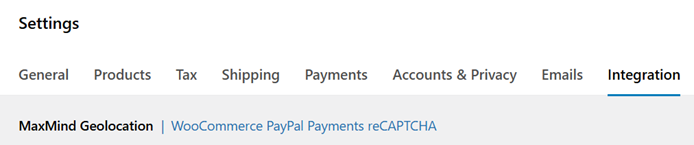
Click on it and fill in the reCAPTCHA keys you have generated.
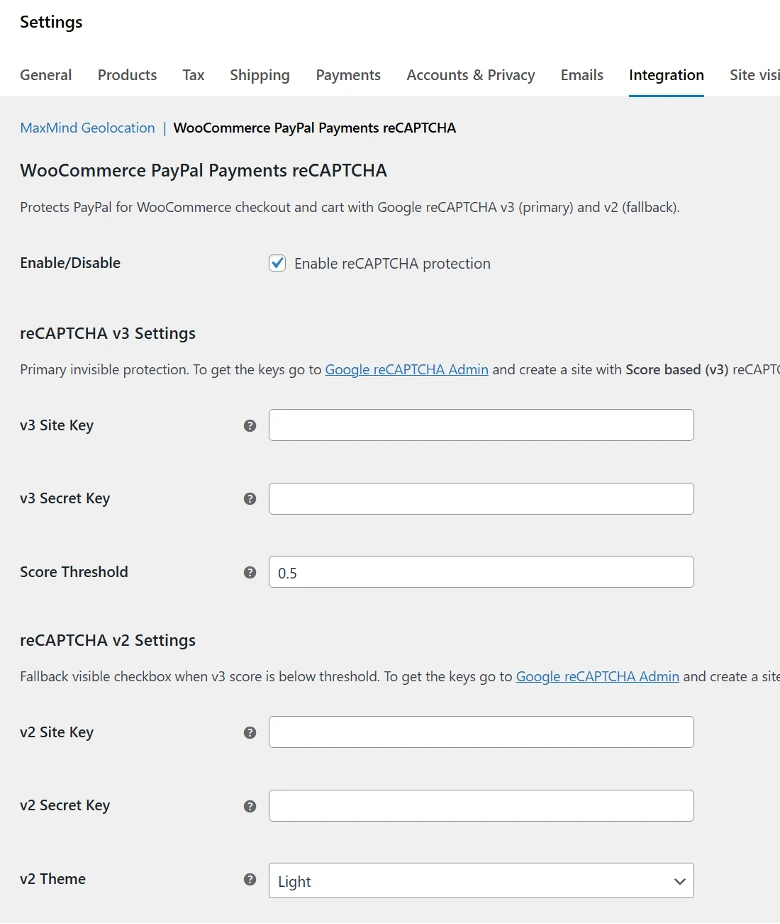
When you are done, save your changes and re-enable the PayPal payment method in WooCommerce > Settings > Payments if you had previously disabled it.
Final thoughts
If you are confident with managing a WordPress site and have the time available, the steps outlined above should fix the latest issue. If you don’t have the time, or the thought of setting up a firewall or installing an update fills you with dread, then contact a reputable agency to look after things, so you can concentrate on the important task of running your business. If in doubt, get in touch and we can help you.